Step 1 - Download file
Please download the template which has an example line included.
Download TemplateStep 2 - Identify your card face
The numbers bellow each card face are to be inputed into the template.

1

2

3

4

5

6
Step 3 - Fill in the template
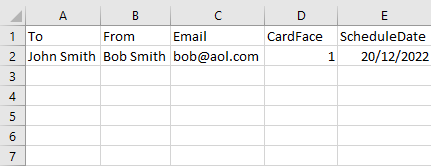
The image bellow is an example of how the template needs to be filled in.
Max characters for 'To' and 'From' is 16. You can review your card on the next page before finalising your order.
Step 4 - Upload the template
Choose the file from your directory and hit upload.